GitHub Copilot’s Connected Cloud Workflow Changes How Developers Work
GitHub’s new connected Copilot cloud experience turns coding-agent work into a resumable workflow that can begin on a phone, continue in a browser, and finish in an IDE or CLI.
In This Article
This article covers GitHub Copilot’s Connected Cloud Workflow Changes How Developers Work. GitHub’s new connected Copilot cloud experience turns coding-agent work into a resumable workflow that can begin on a phone, continue in a browser, and finish in an IDE or CLI.
Key Takeaways
- Published: November 3, 2026
- Category: Developer Tools
- Tags: GitHub Copilot, coding agents, developer tools, cloud sandboxes, MCP
- Views: 51
- Reading time: ~20 min read
"GitHub’s new connected Copilot cloud experience turns coding-agent work into a resumable workflow that can begin on a phone, continue in a browser, and finish in an IDE or CLI."
GitHub’s October 28, 2026 update makes Copilot feel less like a feature inside one editor and more like a connected work surface for software teams. A cloud session can start on github.com, GitHub Mobile, the Copilot CLI, the Copilot app, VS Code, Slack, or Microsoft Teams, then resume from another surface with its context intact. The practical change is not simply “AI coding is now in more places.” It is that an agent task can become a persistent workflow instead of a chat that disappears when you close an app.
The new experience is available to users on paid Copilot plans and is rolling out from October 28. GitHub says cloud sessions run by default in secure, ephemeral sandboxes on GitHub-managed infrastructure. Their compute can draw from the same flexible dollar-based Actions entitlement used for builds, while cloud sandbox billing begins in November 2026. For readers comparing developer software, this is a useful moment to look beyond model quality and ask how well an AI tool fits the way work actually moves between devices, repositories, and team systems.
The important shift is session continuity
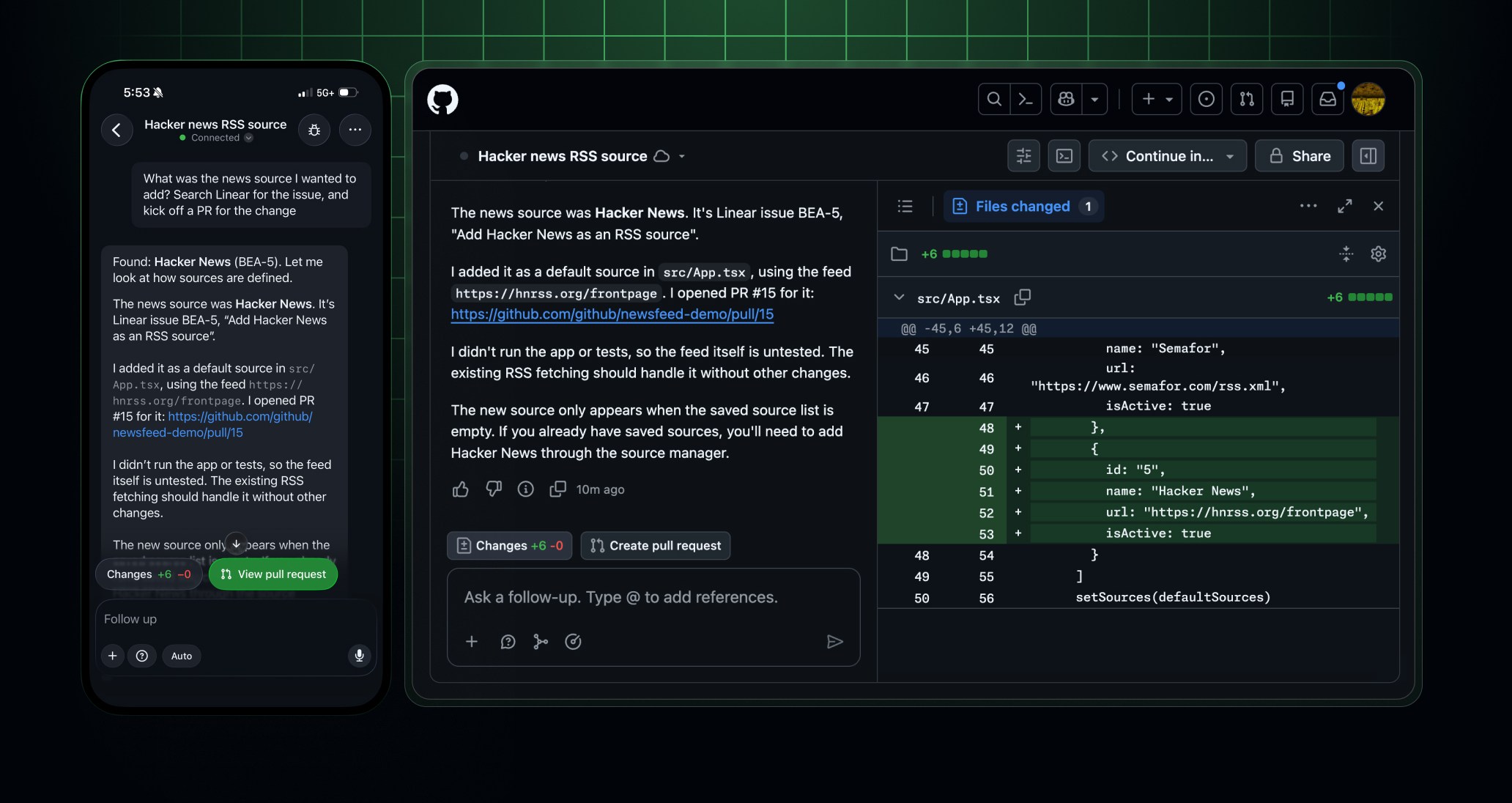
Most coding assistants still make the user reconstruct context whenever work moves from a laptop to a browser or phone. GitHub’s connected Copilot experience targets that gap. You might describe a bug from GitHub Mobile using voice, attach a screenshot, or start from an issue. Later, you can open the same session on github.com, inspect the repository context, approve a change, and continue in VS Code or the CLI.
That continuity matters for tasks that are naturally asynchronous. A developer can ask an agent to investigate a failing test before a commute, review the result on a phone, and return to a local environment when deeper debugging is needed. A team lead can follow a pull-request change without opening the full development workspace. The value comes from reducing the number of times a person has to restate the task, paste logs, or explain which repository and file are relevant.
GitHub’s documentation also describes a boundary between cloud and local execution. Cloud sandboxes are isolated from the local machine, while users can register a local device through GitHub Mission Control and steer local sessions from GitHub Mobile. That distinction is important: convenience does not mean every task should run remotely. Teams still need to decide which work belongs in a managed sandbox, which work requires local credentials or hardware, and which actions should require approval.
Cloud sandboxes make agents more useful, but not automatically safer
A resumable sandbox solves a real operational problem. Agents can run without consuming the developer’s laptop resources, and a saved snapshot can make it possible to resume after the environment shuts down. GitHub says the new sandboxes do not have a one-hour total running-session limit, which makes longer investigations and multi-step changes more practical.
However, isolation is only one part of a safe workflow. The repository permissions, organization policies, tool allowlists, secrets, network access, and approval settings still define what an agent can do. GitHub says access to cloud experiences is governed by a “Copilot in the cloud” policy, and enterprise-managed agent permissions and MCP allowlists can apply to the updated experience.
A sensible rollout starts with low-risk work: documentation updates, test diagnosis, dependency research, or a proposed patch that still needs human review. Before allowing broader automation, teams should audit what a session can read, what it can write, which external tools it can call, and how usage is charged. A fast agent that has unclear permissions is not an efficient developer tool; it is an operational risk with a polished interface.
Connectors reduce MCP setup, while increasing governance needs
GitHub also announced GitHub-verified MCP servers, called connectors, in public preview. The idea is straightforward: connect a service once, then use it across the Copilot app, CLI, VS Code, cloud sessions, and GitHub Mobile. GitHub lists services such as Slack, Figma, Notion, Sentry, Linear, Cloudflare, Vercel, and Work IQ among the initial integrations.
This can remove a lot of repeated setup. Instead of finding an MCP server, installing it locally, configuring credentials in several clients, and repeating the process for every laptop, a team can manage a central connection. An agent investigating a production error can pull relevant Sentry context, check a Linear issue, and compare the requested change with repository history without forcing the developer to copy every detail into the prompt.
The tradeoff is that the connector layer becomes part of the organization’s software supply chain. Administrators should review scopes, sign-in requirements, data retention, service-side permissions, and whether an integration is enabled for personal or organization repositories. Convenience is valuable, but the right question is not “Can Copilot connect to this service?” It is “What is the smallest useful permission set for this workflow?”
What changes for individual developers
For an individual developer, the update is most useful when work is fragmented across locations. A practical workflow could look like this:
- Start with an issue, pull request, screenshot, or voice note on GitHub Mobile.
- Let a cloud session inspect the repository and produce a plan or draft change.
- Continue on github.com to review context, permissions, and the proposed diff.
- Move to VS Code or the Copilot CLI for local tests, deeper edits, or device-specific work.
- Use a connected service only when it adds information that the repository does not contain.
- Record the final test result and human decision in the pull request.
This workflow is a strong reason to evaluate the surrounding toolchain, not only the assistant. A reliable code editor, terminal, screenshot utility, file organizer, backup tool, and repository client can matter as much as the model. BTTC’s software catalog is a practical place to compare utilities that support those steps, while the BTTC blog covers broader software and AI workflow changes.
What teams should check before enabling it
The first check is cost. GitHub says the included Actions entitlement becomes a shared dollar-based pool that can cover standard hosted runners, cloud sandboxes, and larger hosted runners on eligible plans. Because each product has its own published rate, a team should estimate representative tasks instead of assuming that included minutes translate directly into included agent work.
The second check is permission design. Define which repositories can use Copilot in the cloud, which users can connect third-party services, which MCP servers are allowed, and where approval is mandatory. The third check is evidence. Require the agent to leave a test command, changed-file summary, and human review trail rather than treating a successful chat response as proof that the work is correct.
Finally, measure whether session continuity actually saves time. Track repeated prompts, abandoned sessions, review rework, test failures, and cloud usage. The feature is valuable when it removes coordination overhead without hiding decisions from the people responsible for the code.
Frequently asked questions
Is GitHub Copilot’s connected cloud experience free?
GitHub says the new connected cloud experience and cloud sandboxes are available on paid Copilot plans. Copilot Free users can continue using Copilot Chat on github.com and GitHub Mobile, but the connected experience requires an upgrade where applicable. Cloud sandbox usage begins billing in November 2026 and can draw from the included Actions entitlement.
Can a Copilot session move between mobile, web, VS Code, and the CLI?
Yes. GitHub describes one session list and shared context across github.com, GitHub Mobile, the Copilot app, VS Code, and the Copilot CLI. The exact capabilities depend on the surface, repository access, plan, and organization policies.
Are Copilot cloud sandboxes the same as running an agent on my laptop?
No. Cloud sessions run in isolated GitHub-managed environments by default. A local device can be registered separately when a task needs local files, credentials, hardware, or a developer-controlled environment. Teams should choose the execution location deliberately.
Do Copilot connectors replace all MCP configuration?
No. GitHub-verified connectors reduce setup for supported services, but organizations may still need to enable policies, approve allowlists, and configure service-side access. Custom local or remote MCP servers remain a separate option.
Conclusion
GitHub’s connected Copilot cloud experience is important because it changes the unit of work from a single assistant conversation to a session that can travel with the developer. Mobile capture, web context, cloud execution, local steering, connectors, and shared compute can make agentic development more practical for real teams. They also make governance, cost controls, permissions, and review evidence more important than before.
The best way to evaluate the update is to run one narrow workflow end to end: start with a low-risk issue, continue it across two surfaces, inspect every permission and tool call, run the tests, and compare the time and rework with a normal process. If the workflow helps, expand it gradually. If you are still assembling the rest of your developer setup, use BTTC’s software discovery pages to find the utilities that make the human side of the workflow faster and safer.