Android Studio BYOA: What Choosing Any AI Agent Means for Android Developers
Android Studio is bringing AI-agent choice into the IDE. BYOA can reduce context switching, but reliable results still require permission control, code review, and real Android testing.
In This Article
This article covers Android Studio BYOA: What Choosing Any AI Agent Means for Android Developers. Android Studio is bringing AI-agent choice into the IDE. BYOA can reduce context switching, but reliable results still require permission control, code review, and real Android tes...
Key Takeaways
- Published: October 25, 2026
- Category: Developer Tools
- Tags: Android Studio, AI agents, Android development, developer tools, coding assistants
- Views: 40
- Reading time: ~18 min read
"Android Studio is bringing AI-agent choice into the IDE. BYOA can reduce context switching, but reliable results still require permission control, code review, and real Android testing."
Android Studio is moving toward a more open model for AI-assisted development. In an official Android Developers announcement, Google introduced Bring Your Own Agent, or BYOA, so developers can connect supported AI coding agents instead of being limited to one built-in assistant. The feature was introduced in the Android Studio Rabbit 2 Canary 2 preview line, and the current preview channel should be checked before installing because names and availability can change.
For developers, the important idea is simple: the IDE becomes a control center for several agents, while the developer decides which model, provider, or local workflow is appropriate for a task. That is a meaningful shift from treating AI assistance as one fixed product. It also creates a new software-discovery question: which combination of Android Studio, agents, terminals, file utilities, emulators, and device tools makes an AI-assisted project reliable rather than merely fast?
What Android Studio BYOA actually changes
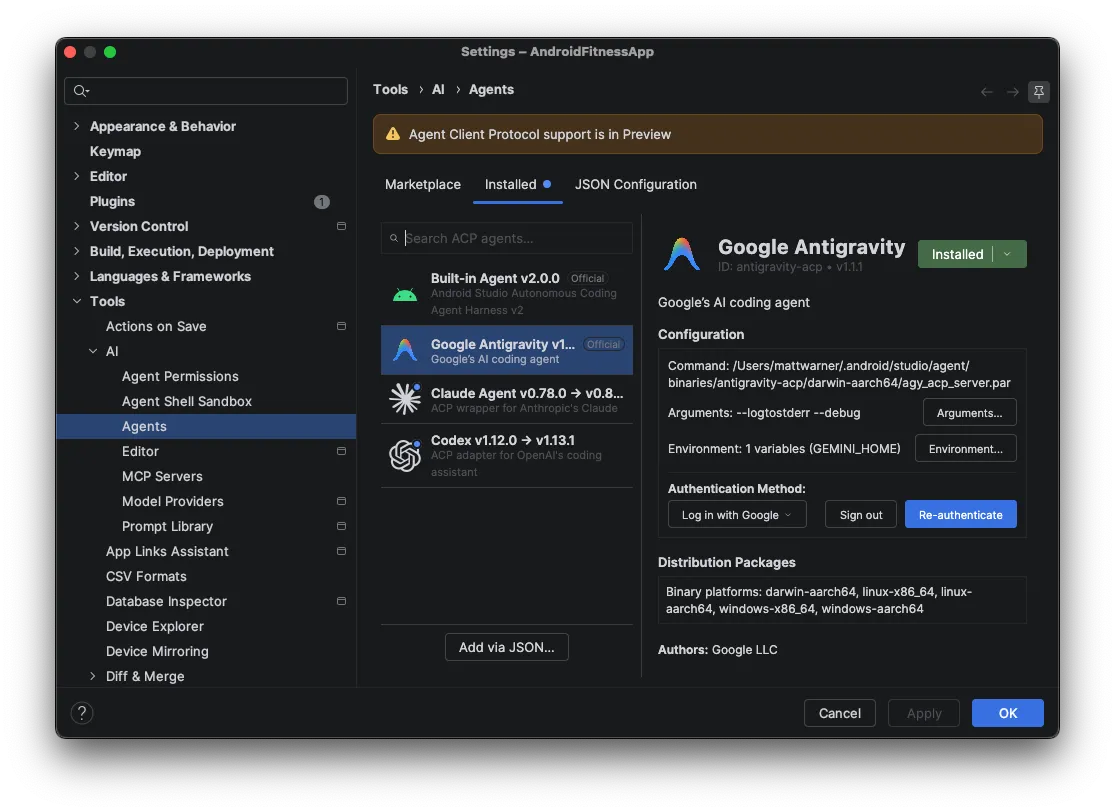
BYOA adds an agent registry and agent selector to Android Studio. Instead of opening a separate tool for every experiment, developers can register supported agents and select one for the current workflow. The official announcement shows agents such as Gemini CLI, Claude Code, OpenAI Codex, and Google Antigravity in the registry experience, while noting that availability depends on the preview build and the agent's own requirements.
This does not mean every agent suddenly has identical capabilities. Each tool can have different authentication, context limits, terminal permissions, model choices, pricing, and support for Android-specific tasks. BYOA is best understood as an integration layer: it reduces the friction of connecting agents to an Android project, but it does not remove the need to evaluate them.
The Android Studio team also describes an Agent Mode that can work with the Android development environment. In practice, that matters because an agent is more useful when it can see the project structure, understand build files, run checks, and help iterate on a feature instead of only generating isolated snippets.
Why developers are paying attention now
AI coding tools have become a workflow decision, not just a code-completion feature. A developer may use one agent for repository exploration, another for a carefully scoped refactor, and a third for a local or terminal-heavy task. The choice can depend on privacy, cost, latency, model quality, or whether the task needs a large amount of project context.
An IDE-level registry makes that experimentation easier to manage. It also makes the boundary between editor, terminal, and AI agent more visible. If a project uses Android Studio for editing, Gradle for builds, an emulator for testing, and several agents for planning and implementation, then the surrounding file and download tools become part of the development system too. Readers building a practical toolkit can use the BTTC software catalog to discover utilities for archives, file organization, screenshots, media conversion, and other supporting tasks.
The productivity case is real, but not automatic
The strongest use case for BYOA is not asking an agent to create an entire application from one prompt. It is reducing repetitive context switching. A developer can ask an agent to inspect a failing build, explain a Gradle dependency conflict, outline a small Compose change, or prepare a test plan. The developer can then review the result inside the same project environment.
That workflow is faster only when the project has boundaries. Keep tasks small enough to review. Ask for a plan before a broad edit. Require the agent to name files, explain assumptions, and report tests it actually ran. For Android work, distinguish source changes from emulator behavior, device permissions, login flows, and Play Console operations that still need human verification.
A useful rule is to treat agents as junior collaborators with strong recall and uneven judgment. They can search quickly and produce plausible code, but they can also misunderstand product requirements, invent APIs, or report a fix without exercising the relevant runtime path.
Security and privacy questions to answer first
Connecting more agents also expands the number of credentials and permissions in a development environment. Before registering an agent, check how it authenticates, what files it can read, whether it can execute shell commands, where prompts and source code are processed, and how access can be revoked.
Use separate credentials for experiments, avoid placing secrets in project files, and keep production keys outside the workspace. Review generated diffs rather than accepting broad changes automatically. If a tool can run commands, use a restricted project or a disposable branch for unfamiliar agents. The official Android Studio preview page is the right place to confirm the build channel and installation guidance; do not rely on screenshots or old tutorials when a preview feature is changing quickly.
A practical BYOA setup for an Android project
Start with one project and one clearly defined task. Install the preview build only in a separate environment if the project is important, because preview IDEs can introduce compatibility issues. Register one agent, verify its permissions, and ask it to summarize the repository without changing files.
Next, create a repeatable loop: write a short task brief, ask for a proposed plan, approve a narrow implementation, run the build and relevant tests, then inspect the diff. Keep a record of which agent produced which change. If you add a second agent, give it a distinct role, such as architecture review, test generation, or documentation, rather than asking two tools to edit the same files at once.
The surrounding workflow matters as much as the agent. Keep backups of source and generated artifacts, use version control, and maintain a clean path to the Android SDK, Gradle caches, emulator images, and exported screenshots. The BTTC blog is also useful for finding adjacent tool and workflow guides as your setup grows.
What BYOA means for Android Studio's future
BYOA points toward an IDE that coordinates multiple specialized assistants instead of treating AI as a single switch. That could make Android Studio more attractive to teams with different model preferences, but it also raises the importance of interoperability, permission controls, reproducible prompts, and honest test reporting.
The near-term benefit is optionality. Developers can try a new agent without abandoning their existing Android project workflow. The near-term risk is tool sprawl: more extensions, more credentials, more inconsistent behavior, and more opportunities to confuse generated code with verified software.
Frequently asked questions
Is Android Studio BYOA available in the stable release?
The BYOA announcement describes it as a preview feature introduced in an Android Studio Canary build. Check the current Android Studio preview documentation before installing, because preview features and supported agents can change between releases.
Which AI agents can Android Studio connect to?
The announcement demonstrates a registry that includes Gemini CLI, Claude Code, OpenAI Codex, and Google Antigravity. The exact list depends on the preview build, operating system, installation requirements, and the agent's own availability.
Does BYOA replace Android Studio's built-in AI features?
No. BYOA is an additional way to connect supported agents. Developers should choose the tool that fits the task and continue to use Android Studio's normal editor, build, debugging, and testing features.
Is an AI agent safe to let edit an Android project?
Safety depends on permissions, credentials, review practices, and the project environment. Start with a disposable branch or test project, keep secrets out of the workspace, inspect diffs, and run builds and tests yourself before trusting a change.
Conclusion
Android Studio BYOA is worth watching because it turns AI-agent choice into part of the IDE workflow. The feature can reduce context switching and make it easier to compare tools, but productivity still depends on disciplined reviews, narrow tasks, secure credentials, and real Android testing. Treat the preview as an integration experiment, build a repeatable workflow around it, and use the broader BTTC software catalog to fill the practical gaps around your development environment.

