GitHub Copilot Canvases: Why Visible AI Agent Workflows Matter
GitHub Copilot canvases point to a broader software trend: AI agents need visible plans, review gates, cost controls, and auditable workspaces.
In This Article
This article covers GitHub Copilot Canvases: Why Visible AI Agent Workflows Matter. GitHub Copilot canvases point to a broader software trend: AI agents need visible plans, review gates, cost controls, and auditable workspaces.
Key Takeaways
- Published: August 18, 2026
- Category: AI Developer Tools
- Tags: GitHub Copilot, AI agents, developer tools, workflow automation, software selection
- Views: 293
- Reading time: ~14 min read
"GitHub Copilot canvases point to a broader software trend: AI agents need visible plans, review gates, cost controls, and auditable workspaces."
TL;DR
GitHub's August 17 post on Copilot canvases describes a practical shift in AI development tools: instead of hiding agent activity inside a chat transcript, a canvas turns long-running work into visible stages, editable artifacts, review gates, and cost-aware checkpoints. That matters for developers, product teams, and software buyers because agentic workflows are moving from novelty demos into everyday modernization, website building, and automation tasks. The best tools will not simply run faster; they will make AI work inspectable enough that humans can steer it before code, content, or data changes reach production.
Why GitHub's canvas idea is timely
The official GitHub Blog article frames canvases as a way to make agentic workflows visible, steerable, and cost-efficient. The timing is important. Teams have spent the last two years adding copilots, chatbots, code agents, document assistants, and automation bots to their stack. Many of those tools can produce useful work, but they often feel like black boxes: a user asks for a result, waits, and then receives a large diff or a long answer that is hard to audit.
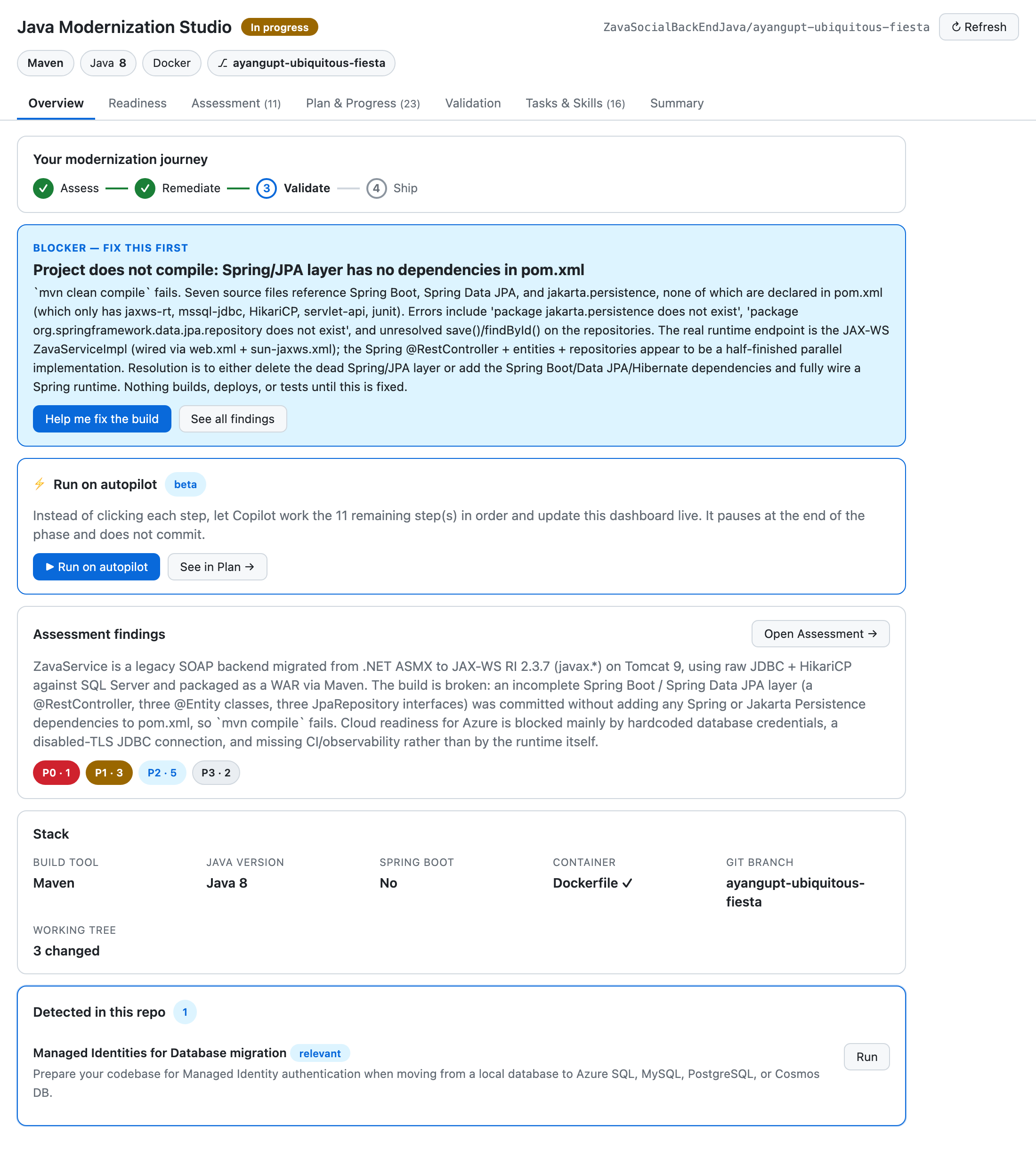
A canvas changes the interaction model. It gives the agent a workspace with phases, cards, findings, progress indicators, and reviewable outputs. In GitHub's examples, the canvas can show a Java modernization journey or a site-building flow. Instead of asking users to trust an invisible chain of prompts, the interface exposes what the agent is doing, which parts are ready for review, and where the human should intervene.
From chatbots to operational workspaces
Chat is a good interface for questions, but it is a weak interface for multi-step work. Real software tasks involve context, dependencies, tests, approvals, and sometimes rollback plans. When an AI agent modifies code, migrates frameworks, drafts pages, or configures tools, the user needs more than a final message. They need to see the plan, the evidence, the risk, and the next decision.
This is why canvases are relevant beyond GitHub Copilot. A good AI workspace can separate planning from execution, group related changes, surface blockers, and give non-expert stakeholders a clearer view of progress. It can also reduce wasted tokens and repeated prompts because the agent can operate against structured state instead of rediscovering context in every chat turn.
For readers comparing developer utilities, automation apps, or productivity downloads, the lesson is simple: look for tools that expose intermediate work. The BTTC software catalog is a useful place to compare practical tools, but the evaluation criteria should now include transparency, reviewability, and control, not only feature lists.
What to look for in AI agent tools
A canvas-style interface is valuable only if it improves decisions. Teams should check whether the tool shows task stages, planned actions, files touched, source references, test results, and estimated cost. It should be easy to pause the agent, edit instructions, approve a subset of work, or reject a risky path. If the product claims to run on autopilot, it should still make the autopilot route inspectable.
Security and privacy matter as well. Agent workspaces may contain source code, documents, prompts, credentials, or customer data. A responsible tool should explain what context is uploaded, how long it is retained, which model providers process it, and whether logs can be deleted. For enterprise software, audit trails and role-based approvals are not optional details; they are part of making AI work safe.
Cost controls are another signal. Long-running agents can spend money quickly when they loop through files, call tools, or regenerate output. Canvases can help by showing progress and checkpoints, but teams should still demand usage reporting, limits, and a clear explanation of what counts as billable activity.
How builders can apply the pattern
You do not need to copy GitHub's exact interface to benefit from the pattern. If you build internal AI tools, start by mapping the workflow into visible stages: intake, plan, evidence, draft, validation, review, and publish. Store the agent's assumptions and source links next to the output. Make every destructive or externally visible action require a clear confirmation step. Add a compact summary for managers and a detailed log for technical reviewers.
Content and marketing teams can use the same approach. A blog-generation workflow should show topic scoring, source notes, draft quality checks, localization status, images used, and publish receipts. That keeps AI-assisted publishing aligned with SEO, GEO, and brand standards. Readers interested in this side can browse more BTTC guides at https://www.bttc.site/blog.
Practical checklist before adopting a canvas-based agent
- Confirm the tool exposes a plan before it edits important files.
- Check whether every stage has human-readable evidence.
- Require source links for research, dependency, or migration claims.
- Test whether the agent can be paused, corrected, and resumed.
- Review privacy settings for code, documents, prompts, and logs.
- Measure cost per completed task, not only subscription price.
- Prefer tools that preserve review history and exportable artifacts.
FAQ
What is an AI canvas?
An AI canvas is a structured workspace that shows an agent's plan, progress, outputs, and review points instead of keeping the whole interaction inside a linear chat thread.
Is this only useful for developers?
No. Developers may benefit first because code tasks have clear tests and diffs, but the same pattern helps content production, research, design handoff, operations, and software selection.
How does this affect software downloads?
When downloading AI-powered tools, users should prefer products that show intermediate work, explain data handling, support review gates, and make automated actions reversible or auditable.
Conclusion
GitHub's canvas direction points to the next phase of AI tools: not just smarter agents, but more observable agents. For teams choosing software, the winning products will combine automation with clear plans, evidence, controls, and human review.