Copilot Canvas and the Next Wave of AI Developer Workflows
GitHub’s Copilot Canvas examples show why AI developer tools are moving beyond chat into visual, persistent workspaces for issues, code maps, and team planning.
In This Article
This article covers Copilot Canvas and the Next Wave of AI Developer Workflows. GitHub’s Copilot Canvas examples show why AI developer tools are moving beyond chat into visual, persistent workspaces for issues, code maps, and team planning.
Key Takeaways
- Published: July 22, 2026
- Category: AI Developer Tools
- Tags: AI, Developer Tools, GitHub Copilot, Productivity, Software
- Views: 366
- Reading time: ~14 min read
"GitHub’s Copilot Canvas examples show why AI developer tools are moving beyond chat into visual, persistent workspaces for issues, code maps, and team planning."
TL;DR
GitHub's latest guidance on Copilot Canvas points to a larger shift in AI development tools: chat is no longer the whole interface. Developers increasingly want visual, persistent workspaces where AI can organize issues, map a codebase, compare sessions, and turn scattered context into a shared plan. That matters for teams because the next productivity jump will come from combining AI coding assistants with reliable tool discovery, documentation, and lightweight workflow software.
Why Copilot Canvas is getting attention
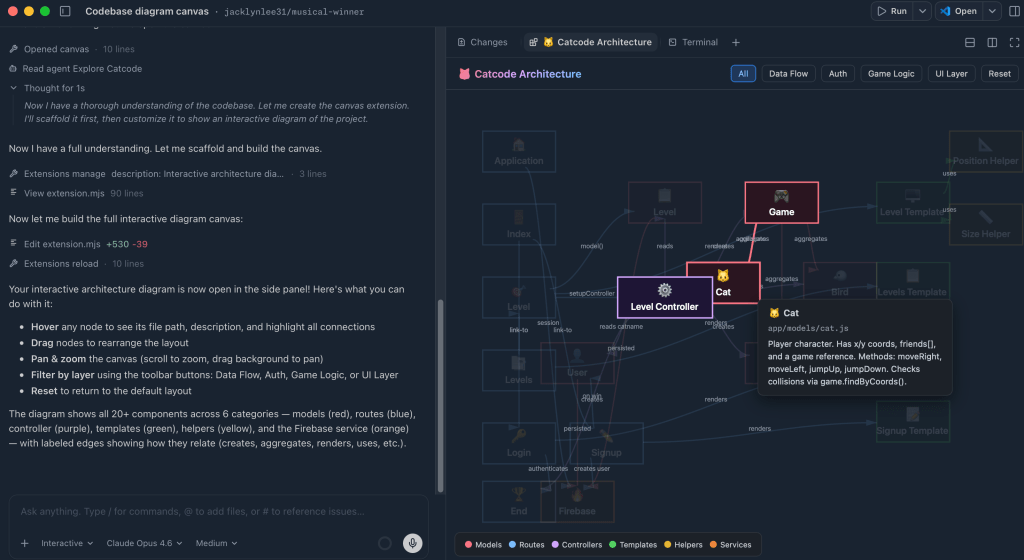
GitHub published a practical look at building interactive Canvas experiences for Copilot, with examples such as issue triage boards, codebase diagrams, worktree views, prompt coaching, and cross-workspace knowledge finders. The original post is worth reading on the GitHub Blog because it shows that AI developer tools are moving beyond a single prompt box. Instead of asking an assistant one question at a time, a canvas can keep state, display structured objects, and let humans manipulate the result.
That change is important because many development tasks are spatial. Engineers reason about dependency graphs, issue clusters, release plans, branches, screenshots, logs, and documents. A chat transcript can explain those things, but it often hides the structure. A canvas makes the structure visible. It can show which issues belong together, where a code path travels, or how several AI sessions differ before a team decides what to merge.
For readers of BTTC, the practical takeaway is simple: the winning AI workflow is not just one model or one IDE extension. It is a toolkit. You need coding assistance, but you also need utilities for documents, media, file conversion, screenshots, notes, testing, and everyday productivity. That is why our software discovery page is a useful companion for anyone redesigning a personal or team workflow around AI.
What a canvas adds beyond chat
A chat interface is fast for questions, drafts, and quick fixes. A canvas is better when the work has multiple moving parts. In GitHub's examples, a canvas can turn issue triage into cards, visualize code relationships, compare worktrees, or help a user improve prompt wording. These are not decorative features. They reduce the mental cost of switching between tabs, remembering prior context, and translating a model's answer into an action plan.
The same idea applies outside software engineering. Product teams can map feature requests. Designers can compare asset versions. Writers can plan content clusters. Support teams can group recurring bug reports. In every case, AI becomes more useful when its output is structured enough for humans to inspect, edit, and reuse.
How teams should evaluate AI workflow tools
Before adopting a canvas-style AI tool, teams should ask five questions. First, does the tool preserve context across sessions, or does every task restart from zero? Second, can humans edit the intermediate objects, not only accept or reject a final answer? Third, does it connect to the systems where work actually happens, such as GitHub issues, documentation, tickets, or local files? Fourth, can the team audit what changed and why? Fifth, does the workflow export cleanly into the tools people already use?
Those questions protect teams from chasing demos. A beautiful visual interface is only valuable if it shortens the path from idea to shipped work. The best tools will make invisible context visible, keep humans in control, and leave behind durable artifacts: diagrams, checklists, pull request notes, test plans, and documentation updates.
A practical workflow you can try this week
Start with one project that feels messy but not mission critical. Export or list the open issues, known bugs, and documentation gaps. Ask an AI assistant to group them into themes, then move the output into a visual board or document. Next, create three views: urgent fixes, workflow improvements, and future experiments. For each item, require a short definition of done and a link to the relevant source.
Then add supporting utilities. Use screenshot or screen-recording software to capture confusing behavior. Use file tools to collect logs and documents into a clean folder. Use writing tools to turn rough notes into release documentation. If you need new utilities, browse BTTC software downloads for productivity and creator tools that can fill gaps around your AI assistant.
SEO and GEO lesson for technology publishers
Canvas-style AI tools also change how technical content should be written. AI search engines and answer engines prefer pages with clear summaries, takeaways, FAQs, and quotable explanations. A strong article should not bury the conclusion. It should state what happened, why it matters, who should care, and what to do next. That is why this post includes a concise summary, practical evaluation criteria, and a FAQ that can be cited by search assistants.
FAQ
Is Copilot Canvas a replacement for chat-based coding assistants?
No. Canvas interfaces complement chat. Chat is still excellent for short questions and direct code help, while a canvas is stronger for planning, visualization, comparison, and multi-step work.
Who benefits most from canvas-style AI tools?
Developers, product managers, technical writers, support teams, and creators benefit when their work involves many related objects. If you need to organize issues, files, diagrams, decisions, or drafts, a canvas can make AI output easier to review.
How does this connect to software downloads?
AI assistants rarely solve the entire workflow alone. Most teams still need focused utilities for documents, images, audio, video, testing, and productivity. A curated catalog such as BTTC Software helps readers find those supporting tools.
Conclusion
GitHub's Copilot Canvas examples are a signal that AI development is becoming more visual, structured, and workflow-aware. The next wave of productivity will come from pairing assistants with tools that preserve context and turn model output into durable artifacts. If you are improving your own workflow, start small: choose one messy process, map it visually, keep humans in control, and add the right supporting software where AI alone is not enough.