Agent Plugins 1.0: A Practical Guide to Portable AI Workflows
GitHub Agent Plugins 1.0 makes AI workflows more portable across VS Code, Copilot CLI, and compatible clients. Learn how teams should package, govern, and choose tools around reusable agent skills.
In This Article
This article covers Agent Plugins 1.0: A Practical Guide to Portable AI Workflows. GitHub Agent Plugins 1.0 makes AI workflows more portable across VS Code, Copilot CLI, and compatible clients. Learn how teams should package, govern, and choose tools around reusa...
Key Takeaways
- Published: August 13, 2026
- Category: AI Developer Tools
- Tags: Agent Plugins, MCP, GitHub Copilot, AI workflows, developer tools, software discovery
- Views: 319
- Reading time: ~12 min read
"GitHub Agent Plugins 1.0 makes AI workflows more portable across VS Code, Copilot CLI, and compatible clients. Learn how teams should package, govern, and choose tools around reusable agent skills."
TL;DR
GitHub says Agent Plugins 1.0 is now generally available across VS Code, Copilot CLI, the GitHub Copilot SDK, and the Copilot app. The important idea is simple: build a plugin once, then let compatible agent clients discover the skills and MCP server configuration they can use from the same package. For developers, product teams, and power users browsing the BTTC software catalog, that shifts the question from “which assistant has this one integration?” to “which tools can run the same trusted workflow best?”
Why Agent Plugins 1.0 matters now
The release matters because AI assistants are spreading across editors, terminals, chat surfaces, browser workflows, and custom internal tools. Without a common package shape, every team ends up maintaining separate instructions, manifests, and integration notes for each client. A deployment checklist might live in one IDE extension, a documentation helper in a prompt library, and the MCP server configuration in a completely different repo. That fragmentation creates duplicated work and also creates risk: one copy gets updated, another copy drifts, and the agent uses the wrong instructions at the worst possible moment. The Agent Plugins author docs frame the new format as a way to put skills, MCP configuration, and client-specific extras in one installable structure.
The practical workflow shift
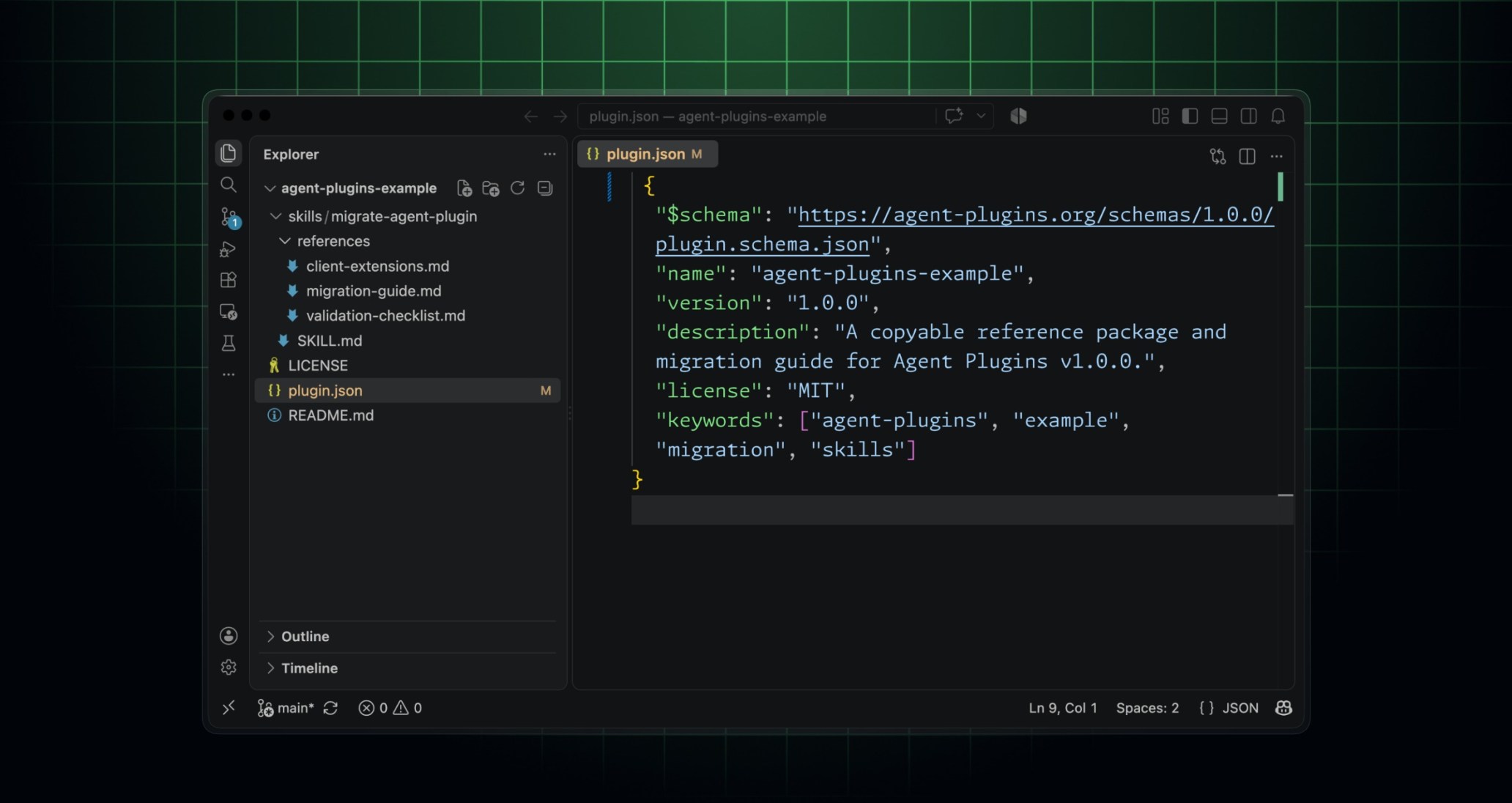
For everyday teams, the practical workflow is not to convert every automation at once. Start with one repeated task that already has a clear runbook: release notes, dependency triage, support-ticket summarization, design QA, test-data setup, or environment diagnostics. Write the human instructions as a skill, connect the needed tool through MCP, and keep vendor-specific features in a namespaced folder instead of mixing them into the portable core. GitHub describes a plugin.json manifest, a skills/ directory, mcp.json, and a com.github.copilot/ directory for Copilot-only behavior. That layout gives teams a useful mental model: portable first, client extensions second.
A migration checklist for teams
A good migration checklist starts with an inventory. List the agent workflows people actually use, where the instructions live, which tools they call, and who owns the workflow when something breaks. Next, choose one low-risk workflow with measurable value. Add schema metadata to the manifest, keep the reusable skill concise, document required secrets or permissions, and test in more than one compatible client before calling it portable. Teams should also keep screenshots, sample prompts, and failure cases in the package repository so reviewers can understand what the plugin is supposed to do. If you are comparing editors, CLIs, file utilities, or automation apps for this work, the broader BTTC blog can help you think in terms of workflow fit instead of brand loyalty.
Governance and security questions
Portability does not remove governance. In fact, it makes governance more visible because the same plugin can travel across several agent clients. Admins need to know who can install marketplace plugins, which MCP servers are allowed, what data those servers can reach, and whether a plugin is approved for a team or the whole organization. The Agent Plugins 1.0 specification is useful reading for maintainers because it shows what is standardized and what still belongs to a client namespace. Treat plugins like lightweight software packages: review changes, pin versions where necessary, remove abandoned packages, and document data boundaries.
How this connects to software discovery
The announcement also changes how people should evaluate productivity software. A single app feature is helpful, but a portable workflow can survive tool changes. When you try a new code editor, terminal assistant, issue tracker, note tool, or screenshot utility, ask whether it helps preserve your workflow package: can it read the same instructions, use the same MCP server, export useful logs, and respect team policy? That is where software discovery becomes strategic. Instead of downloading the flashiest AI tool, choose tools that make repeatable work easier to install, verify, and share.
FAQ
What is Agent Plugins 1.0?
Agent Plugins 1.0 is an open package format for distributing agent skills and MCP server configuration so compatible AI clients can install and govern the same plugin.
Do teams need to migrate immediately?
No. GitHub says existing Copilot plugins that do not target Agent Plugins 1.0 remain supported. The practical move is to pilot the new manifest on one reusable workflow first.
How can this help software discovery?
Portable agent plugins make tool choice more important because teams can compare editors, CLIs, marketplaces, and automation utilities around a shared workflow instead of rebuilding every integration.
Conclusion
Agent Plugins 1.0 is less about a single marketplace and more about a portable operating model for AI-assisted work. Teams that inventory their repeated workflows, package one useful skill with its tool integration, and govern installation carefully will be better prepared as agent clients multiply.