GPT-6 Intelligent UI: Why Interactive AI Answers Are Changing Software
OpenAI's GPT-6 adds Intelligent UI to ChatGPT, turning answers into interactive charts, forms, buttons, and task-specific tools. Here is what changes.
In This Article
This article covers GPT-6 Intelligent UI: Why Interactive AI Answers Are Changing Software. OpenAI's GPT-6 adds Intelligent UI to ChatGPT, turning answers into interactive charts, forms, buttons, and task-specific tools. Here is what changes.
Key Takeaways
- Published: October 24, 2026
- Category: AI and Software
- Tags: GPT-6, Intelligent UI, ChatGPT, AI tools, software discovery, OpenAI
- Views: 24
- Reading time: ~19 min read
"OpenAI's GPT-6 adds Intelligent UI to ChatGPT, turning answers into interactive charts, forms, buttons, and task-specific tools. Here is what changes."
TL;DR
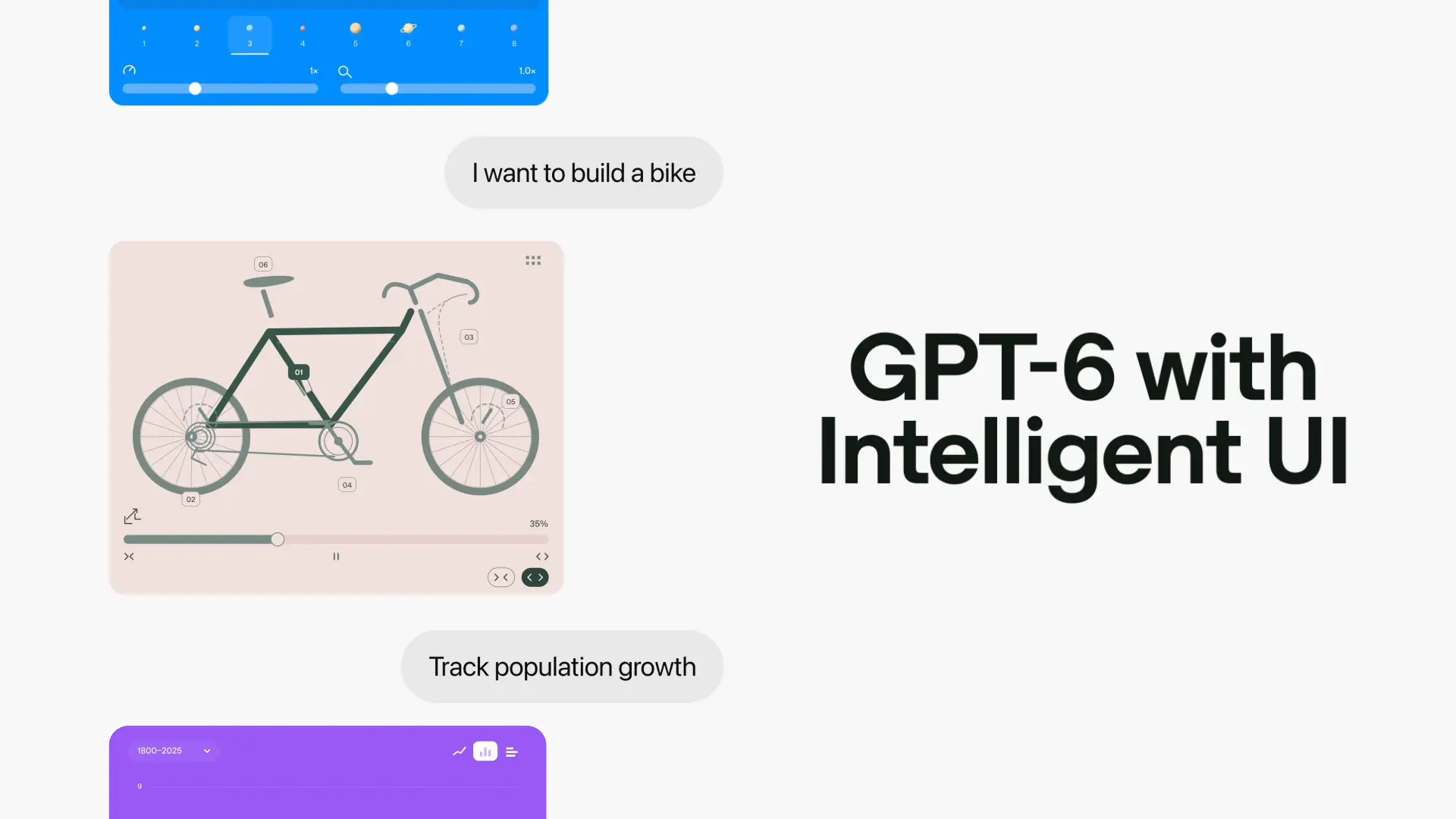
OpenAI's October 7, 2026 GPT-6 rollout is notable for more than a new model name. In ChatGPT's standard Chat tab, GPT-6 introduces Intelligent UI: responses can combine text with graphics, charts, forms, buttons, diagrams, and small interactive tools. Instead of explaining a calculation and leaving the reader to build a spreadsheet, ChatGPT can create a calculator in the conversation. Instead of describing a route or comparison as a block of prose, it can present a visual layout that is easier to inspect.
The strategic shift is from answering questions to shaping a temporary interface around a task. That does not make every answer correct, and it does not remove the need to verify sources, privacy settings, or calculations. It does mean that software discovery is changing: people may increasingly judge a tool by how quickly it turns intent into a usable workflow. Readers comparing productivity, education, planning, and utility apps can use the BTTC software catalog to find established software when a generated interface is not enough.
What GPT-6 Intelligent UI actually adds
OpenAI describes Intelligent UI as a capability that lets GPT-6 compose responses from text, visuals, and interactive elements based on the question. The examples in the announcement include a Sunday-roast schedule next to a recipe, a road-trip map with detours, interactive explanations of difficult subjects, savings calculators, bill splitters, and games that run inside the conversation.
This is different from simply adding an image to an answer. A static image illustrates an idea; an interactive response lets the reader change an input, select an option, or move through a process. The interface becomes part of the explanation. For a financial example, a user could change the monthly contribution and immediately see how the projected result moves. For a learning example, a student could alter a variable in a diagram instead of rereading a paragraph about the same relationship.
OpenAI says GPT-6 chooses the format according to the task. A comparison may work best as a side-by-side view, a complex concept may need an interactive diagram, and a simple question may still deserve plain text. That conditional behavior matters because good interface design is not the same as adding more controls. The useful answer is the one that reduces cognitive work without hiding important assumptions.
Why this matters for everyday software
For years, most software required people to learn a fixed interface. You opened a budgeting app, found the right screen, located the input fields, and learned the application's terminology. Intelligent UI reverses that relationship for small, one-off tasks: the user describes the goal first, and the system assembles a surface that fits the request.
That model is especially attractive for tasks that are too small for a dedicated app but too structured for a paragraph. Splitting a restaurant bill, comparing two travel plans, checking a study schedule, exploring a home budget, and visualizing a workout plan all benefit from structured inputs and immediate feedback. A generated tool can be faster than searching an app store, installing software, creating an account, and learning a new navigation pattern.
However, temporary interfaces also have weaknesses. A generated calculator may make an incorrect assumption about taxes or interest. A travel plan may omit a restriction. A chart may look authoritative even when the underlying data is incomplete. The interface can make an answer feel more finished than it really is. Users should treat the visual layer as a usability improvement, not as evidence that the underlying reasoning is reliable.
How the technical design works
OpenAI says it built a library of native, streamable components and a compiler that processes the interface while the model generates it. The component library supplies familiar design foundations, while the model decides how the pieces should be arranged for a particular question. Progressive rendering lets the interface appear as generation continues instead of waiting for every element to finish.
This architecture explains why the feature feels different from a chatbot that returns a long HTML snippet. The model is not merely writing a page for a browser to interpret later; it is selecting from a controlled set of interactive building blocks. That can improve consistency and performance, but it also creates a new evaluation surface. A product team must test not only whether the text is accurate, but also whether the controls are understandable, the state is preserved, the labels are accessible, and the interaction communicates uncertainty.
For developers, the important lesson is not to copy a flashy widget. It is to separate data, decisions, and presentation. A good AI-generated interface should make its inputs visible, show the units and assumptions, provide a way to reset or revise the result, and explain what it cannot determine. Those principles apply equally to conventional apps listed in the BTTC software catalog.
Availability and what users should check
OpenAI's announcement says GPT-6 with Intelligent UI began rolling out globally to ChatGPT Plus, Pro, Business, and Enterprise users in the Chat tab on October 7, 2026, with Free and Go rollout beginning the following day. Enterprise access can depend on administrator settings. The announcement also separates this ChatGPT update from the models powering Work and Codex, so users should not assume every OpenAI surface has identical behavior.
Before relying on an interactive answer, check four things. First, inspect the source or links behind factual claims. Second, look for visible inputs and assumptions before trusting a number. Third, avoid entering sensitive information into a generated tool unless the account, retention, and workspace policies are appropriate. Fourth, use a dedicated application when the task requires durable records, collaboration, audit history, accessibility guarantees, or regulated data handling.
OpenAI's GPT-6 safety evaluation is a useful reference for understanding the model rollout, but a model-level safety report is not a guarantee that every generated interface is suitable for a particular decision. Product context still matters.
What this means for app discovery and SEO
Intelligent UI may reduce some low-intent visits to standalone calculators and reference pages, but it can also increase demand for software that offers persistence, trust, integrations, and specialized workflows. A generated bill splitter is convenient once. A finance app becomes valuable when it stores categories, imports transactions, handles permissions, and supports a repeatable process.
That distinction creates a new opportunity for software publishers. Pages should explain what the product does, show real workflows, state limitations, and make official download paths obvious. Search visibility will depend less on repeating a category name and more on proving that a product solves a specific job better than a one-off generated answer. For readers, the practical strategy is to use AI for exploration, then choose established software when the task becomes recurring or consequential.
FAQ
What is GPT-6 Intelligent UI?
It is a ChatGPT capability that can combine text with graphics, charts, forms, buttons, diagrams, and interactive task-specific experiences instead of returning only prose.
Is Intelligent UI the same as an AI-generated app?
Not exactly. It creates an interactive response inside the ChatGPT conversation. It may be useful for a single task, but it is not automatically a durable app with accounts, saved data, collaboration, backups, or a long-term update path.
Can I trust a generated calculator or chart?
Use it as an aid, not as proof. Check the inputs, units, assumptions, source data, and calculation logic. For financial, health, legal, or work-critical decisions, verify the result with an appropriate authoritative source or dedicated software.
Is GPT-6 Intelligent UI available to every ChatGPT account?
OpenAI says the rollout started with paid ChatGPT tiers on October 7, 2026, followed by Free and Go tiers from October 8. Availability can still vary by account, region, product surface, and enterprise administrator settings.
When should I use a normal software application instead?
Choose dedicated software when you need persistent data, repeatable workflows, integrations, team access, auditability, offline behavior, accessibility support, or stronger control over privacy and updates.
Conclusion
GPT-6 Intelligent UI changes the shape of an AI answer by making the response itself a temporary tool. That is a meaningful usability improvement for planning, learning, comparison, and lightweight calculations, but it is not a substitute for evidence or durable software. The best workflow is to let the interface accelerate exploration, expose assumptions, and then move important or recurring work into a trusted application with clear data, security, and maintenance boundaries.