Google Ads and Analytics AI Tools: A Practical Workflow Guide for Small Teams
Google is adding AI and agentic experiences to Ads and Analytics. Here is how small software teams can turn those insights into better campaigns and download paths.
In This Article
This article covers Google Ads and Analytics AI Tools: A Practical Workflow Guide for Small Teams. Google is adding AI and agentic experiences to Ads and Analytics. Here is how small software teams can turn those insights into better campaigns and download paths.
Key Takeaways
- Published: August 11, 2026
- Category: AI Marketing Tools
- Tags: Google Ads, Google Analytics, AI marketing, software downloads, workflow
- Views: 390
- Reading time: ~13 min read
"Google is adding AI and agentic experiences to Ads and Analytics. Here is how small software teams can turn those insights into better campaigns and download paths."
TL;DR
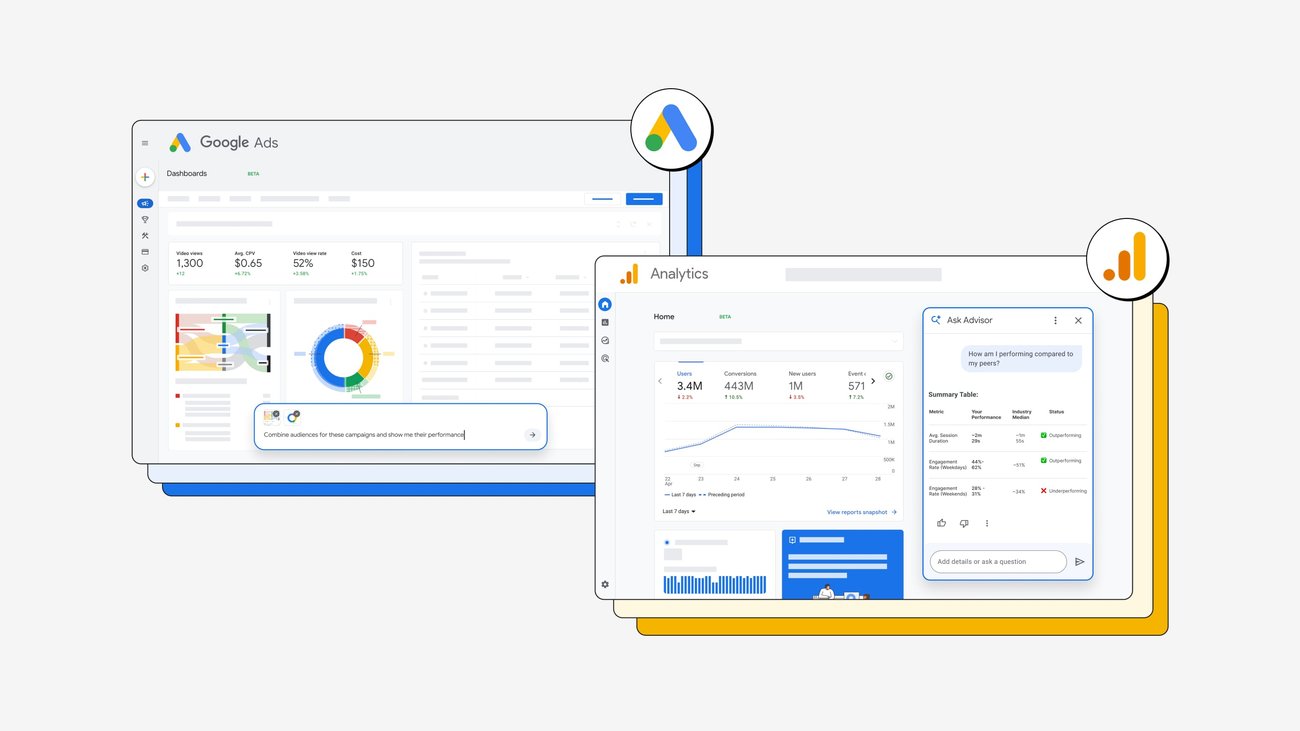
Google's latest Ads and Analytics announcement is important because it moves AI from a side chat box into the daily marketing console. Google says new agentic experiences, Analytics AI Overviews, AI-powered insights cards, prompt-based visual reporting, and business benchmarking are meant to simplify campaign diagnosis and decision-making. For small software teams, app operators, and creators, the opportunity is not just faster reports. It is a chance to build a cleaner workflow where analytics evidence, creative assets, download goals, and weekly review notes stay connected.
Why this announcement matters now
The official Google post, Try new AI tools from Google Ads and Analytics, describes a practical shift in marketing software. Instead of asking users to manually jump between dashboards, spreadsheets, screenshots, and campaign notes, Google is packaging more interpretation directly inside Ads and Analytics. That matters because modern marketers already face too many signals: paid search performance, app installs, landing-page engagement, creator campaigns, social mentions, product updates, and support questions.
The timing also fits a larger technology trend. AI features are moving into the tools where work already happens. Developers see this in coding assistants, designers see it in image editors, and marketers now see it in analytics and advertising workflows. Even hardware news around Google's upcoming Pixel event, covered by The Verge, reinforces the same point: AI is becoming part of the full product and promotion cycle, from device launches to campaign measurement.
What small teams should actually change
Small teams should not respond by replacing every marketing process with automation. The better response is to redesign the weekly review loop. Start with one measurable goal, such as software downloads, newsletter signups, trial starts, or return visits to a blog hub. Then use AI-generated insights as a first pass, not a final verdict. If an AI card says a campaign segment is underperforming, ask what evidence supports it, which landing page changed, which keyword group is involved, and whether the result is statistically meaningful.
This is where a practical tool stack matters. Teams still need screenshot tools for reporting, PDF utilities for sharing summaries, spreadsheet or note apps for decisions, image tools for ad creative, and lightweight mobile utilities for checking campaigns away from a desk. BTTC readers can browse useful supporting apps in the BTTC software directory and compare broader workflow advice in the BTTC blog. AI can point to a pattern, but everyday software turns that pattern into a repeatable habit.
A workflow for AI-assisted marketing reviews
A useful weekly workflow has five steps. First, capture the baseline: traffic, conversion rate, cost per result, top pages, and the content that sent people there. Second, read the AI summary and mark each recommendation as evidence-backed, plausible, or unclear. Third, connect the recommendation to an action, such as refreshing a landing page, testing a new headline, exporting a report, or improving screenshots in a software listing. Fourth, record the action in a shared document so the next review has context. Fifth, check whether the change improved the original goal.
This structure keeps the team from chasing every automated suggestion. It also makes AI more useful because the next prompt can reference a specific decision history. Instead of asking, "What should we do with marketing?" the team can ask, "Which of last week's three landing-page experiments produced the clearest signal for download intent?" That is a much better question.
Risks to watch before trusting AI insights
The biggest risk is false confidence. AI summaries can sound polished even when the underlying data is incomplete, seasonal, or distorted by a one-time promotion. Another risk is losing the source trail. If the team cannot point from an insight back to the exact dashboard, query, date range, or campaign, the insight should not drive budget decisions. Privacy is also important. Marketing teams should avoid pasting sensitive customer lists, private revenue data, or unreleased product details into tools that are not approved for that purpose.
There is also a conversion risk. AI tools can optimize for the metric that is easiest to measure rather than the outcome that matters. A post can get clicks without producing downloads. An ad can lower cost per click while attracting the wrong audience. A dashboard can celebrate engagement while support tickets reveal confusion. The right response is to pair AI insights with human review, source links, and a small number of durable business metrics.
FAQ
What did Google announce for Ads and Analytics?
Google described new AI and agentic experiences across Google Ads and Google Analytics, including AI Overviews in Analytics, AI-powered insights cards in Ads, visual reporting from text prompts, and benchmarking against similar businesses.
Should small teams trust AI marketing recommendations automatically?
No. Treat AI recommendations as a starting point. Confirm the source data, date range, campaign context, and business impact before changing budgets, landing pages, or product messaging.
How can this help software download growth?
AI-assisted analytics can reveal which pages, campaigns, and queries bring high-intent visitors. Teams can then improve internal links, screenshots, tutorials, and calls to action that guide readers toward useful software downloads.
Conclusion
Google's new AI marketing tools are valuable because they make analytics easier to interpret, but they do not remove the need for judgment. The winning workflow combines AI summaries, trusted source data, clear documentation, and practical software tools that help teams turn insights into better campaigns and more useful download paths.