GitHub Copilot Canvases Signal the Next Phase of AI Workflows
GitHub’s new Copilot canvas guide shows why AI productivity tools are moving beyond chat boxes into interactive workspaces that teams can inspect and reuse.
In This Article
This article covers GitHub Copilot Canvases Signal the Next Phase of AI Workflows. GitHub’s new Copilot canvas guide shows why AI productivity tools are moving beyond chat boxes into interactive workspaces that teams can inspect and reuse.
Key Takeaways
- Published: July 22, 2026
- Category: NEWS
- Tags: AI, Developer Tools, GitHub Copilot, Productivity, Software Workflows
- Views: 326
- Reading time: ~15 min read
"GitHub’s new Copilot canvas guide shows why AI productivity tools are moving beyond chat boxes into interactive workspaces that teams can inspect and reuse."
Source: https://github.blog/ai-and-ml/github-copilot/how-to-build-interactive-experiences-with-canvases/
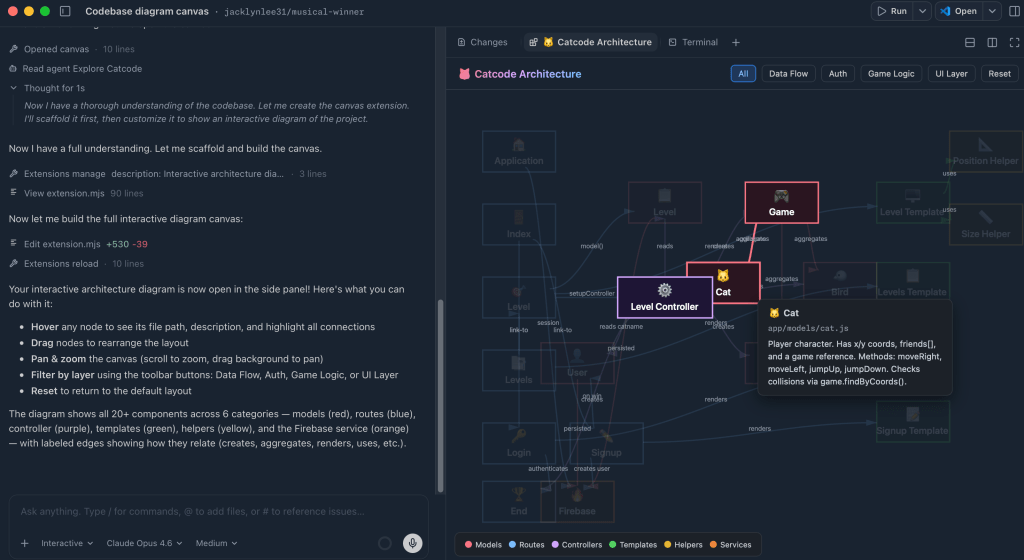
GitHub’s new guide to building interactive experiences with canvases is more than a UI tutorial. It is a clear sign that AI coding assistants are moving from single chat windows into richer workspaces where developers can inspect issues, draw codebase diagrams, compare agent sessions, coach prompts, and search team knowledge without losing context. The GitHub post describes how Copilot canvases can turn an assistant response into cards, diagrams, worktree views, knowledge finders, or prompt helpers that a developer can manipulate directly.
For BTTC readers, the important lesson is not that every product needs a canvas tomorrow. The lesson is that useful AI tools are becoming workflow surfaces. If you are evaluating coding assistants, note-taking apps, project-management tools, or automation software, look past the model name and ask whether the product helps you understand, revise, and reuse the work. The BTTC software directory is a good place to compare practical tools through that lens, and the BTTC blog will keep tracking these AI workflow shifts.
TL;DR: AI tools are becoming interactive workspaces
GitHub’s canvas examples show a broader productivity trend: the best AI experiences no longer stop at a paragraph of generated text. They give users structured objects they can click, sort, connect, validate, and hand off. In software development, that might mean issue triage cards, dependency diagrams, pull-request checklists, or side-by-side agent runs. In business teams, the same pattern can become research boards, content calendars, customer-support queues, or decision dashboards.
This matters because chat is excellent for open-ended conversation but weak for complex state. A developer may need to see which files changed, which branch an agent used, which issue is blocked, which prompt produced a better result, and which internal document supports a recommendation. A canvas gives the AI output a place to live, so humans can inspect it before they trust it.
Why GitHub’s canvas post is fresh and useful
The GitHub article, published on July 21, 2026, walks through concrete canvas ideas for Copilot: transforming issues into cards, mapping a codebase as a diagram, reviewing worktrees from multiple Copilot sessions, improving prompts with a coach, and finding knowledge across workspaces. Those examples are specific, but the pattern is general. AI products are adding visual and interactive layers because teams need more than “answer generation.” They need coordination, memory, review, and repeatable workflows.
That is especially relevant after the first wave of AI adoption. Many teams already know that a coding assistant can draft code or summarize a file. The harder problem is operational: How do you keep context across sessions? How do you compare two agent attempts? How do you prevent a confident answer from hiding a risky assumption? How do you bring non-developers into the review process? Interactive surfaces answer those questions better than a long transcript.
What a canvas changes for developers
A canvas turns AI output into an object. An issue triage canvas can show priorities, labels, owners, and next actions. A codebase diagram can make dependencies visible before a refactor. A worktree view can expose how separate AI sessions changed files, which reduces the chance of merging conflicting work. A prompt coach can help a team standardize better instructions instead of leaving every developer to reinvent prompts privately.
The biggest benefit is auditability. When AI writes a paragraph, users must mentally track what is true, what is missing, and what should happen next. When AI fills a structured board, users can review individual cards, reorder them, edit fields, and connect the result to existing tools. That makes the assistant less magical but more useful.
How to evaluate AI coding tools now
Start with the workflow, not the brand. If your team needs bug fixing, inspect how a tool links issues to files, tests, branches, and pull requests. If you need architecture help, check whether it can visualize dependencies or only summarize them. If you run multiple agents, ask how sessions are compared and whether changes can be reverted cleanly. If prompts matter, look for saved templates, examples, and team knowledge features.
Also check export and portability. A beautiful canvas is less valuable if the data cannot become an issue, a markdown document, a diagram, or a task in another system. The most durable AI productivity tools will let teams move between chat, canvas, code, tickets, and documentation. That is why software discovery matters: the right tool is the one that fits the way your team already works while making repeated tasks easier.
BTTC takeaways for software buyers
First, prefer tools that expose intermediate steps. If an AI assistant can show assumptions, files, tasks, and evidence, it is easier to trust. Second, prefer tools that support review. A developer should be able to accept one part of an AI result while rejecting another. Third, prefer tools that turn useful work into reusable assets: diagrams, checklists, prompts, snippets, and documentation.
This trend is not limited to developers. Marketers can use AI canvases to plan content clusters. Product managers can organize customer feedback. Students can build research maps. Small businesses can track automation ideas and compare software options. The common principle is the same: AI should create structured work products, not just text that disappears in a chat history.
FAQ
Is a canvas better than a chatbot for every task?
No. Chat is still fastest for questions, brainstorming, and quick edits. A canvas becomes valuable when the task has multiple parts, needs review, or must be reused by a team.
Does this mean GitHub Copilot is only for large engineering teams?
No. Small teams can benefit when canvases help them understand a codebase, organize issues, or review AI-generated changes. The key is choosing features that reduce confusion rather than adding another dashboard.
What should I look for in an AI productivity tool?
Look for clear workflow integration, visible evidence, exportable outputs, team review, and sensible links to the tools you already use. If a tool cannot help you verify or reuse AI work, it may remain a demo rather than a daily system.
Conclusion
GitHub’s Copilot canvas guide shows where AI software is heading: from answer boxes toward interactive workspaces. The winning tools will not only generate code or text; they will help people inspect, organize, improve, and safely reuse AI-assisted work. For anyone comparing new productivity software, that is the standard to apply now.


