GitHub Copilot SDK for Java: What Enterprise AI Agents Mean for Developers
GitHub's Copilot SDK for Java points to a practical shift: AI agents are becoming application architecture. Here is how teams should evaluate the opportunity, risks, and supporting tools.
In This Article
This article covers GitHub Copilot SDK for Java: What Enterprise AI Agents Mean for Developers. GitHub's Copilot SDK for Java points to a practical shift: AI agents are becoming application architecture. Here is how teams should evaluate the opportunity, risks, and supporting...
Key Takeaways
- Published: August 11, 2026
- Category: AI Development Tools
- Tags: GitHub Copilot, Java, AI agents, developer tools, enterprise software
- Views: 278
- Reading time: ~13 min read
"GitHub's Copilot SDK for Java points to a practical shift: AI agents are becoming application architecture. Here is how teams should evaluate the opportunity, risks, and supporting tools."
TL;DR
GitHub's new engineering walkthrough for the Copilot SDK for Java matters because it shows how AI agents are becoming normal parts of enterprise application design, not just chat panels in an IDE. The practical opportunity is to connect language-model reasoning with Java services, secure data access, background workers, and user-facing progress updates. The practical risk is treating agents like black boxes before teams have logging, permissions, evaluation, and human review in place.
Why developers are paying attention now
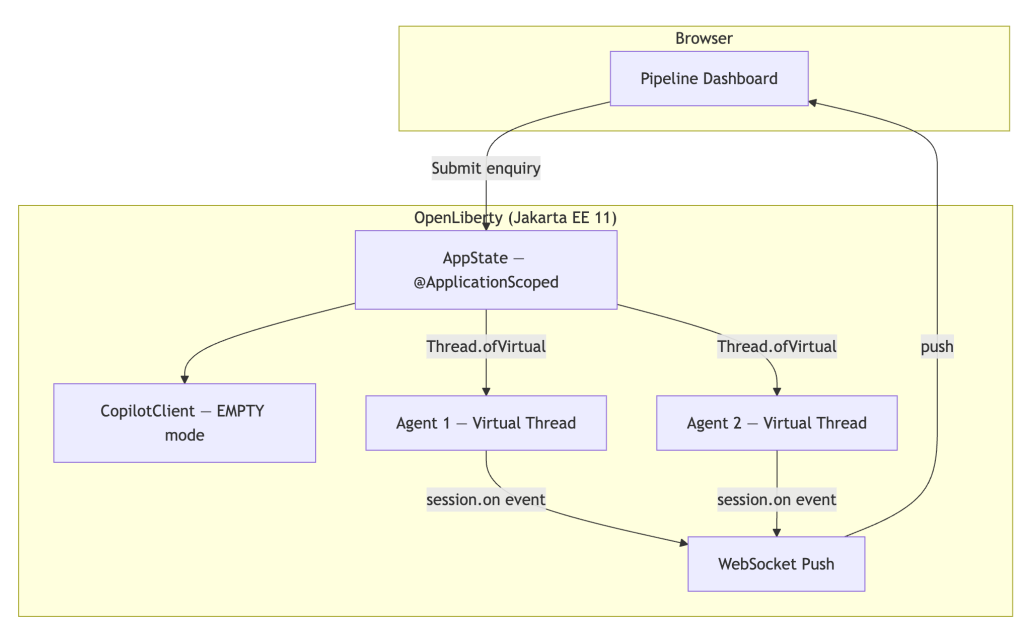
GitHub's article, Using the GitHub Copilot SDK for Java, is notable because it focuses on application architecture rather than hype. The sample described by GitHub uses a browser dashboard, an Open Liberty server, virtual-thread agents, WebSocket progress updates, and a Copilot client. That framing is exactly what enterprise teams have been waiting for: a way to place AI assistance inside systems they already understand.
The larger trend is bigger than one SDK. GitHub also recently explained how slash commands can make Copilot interactions more repeatable, while Google highlighted massive interest in agent and vibe-coding education through its developer programs. Together, those signals suggest that AI coding assistants are shifting from personal productivity tools into platform components that can be embedded in internal workflows.
What the Java SDK changes
Java remains deeply entrenched in banks, logistics platforms, healthcare systems, retail back ends, and internal enterprise portals. When agentic AI reaches Java developers directly, it lowers the friction for adding AI-powered triage, document analysis, code explanation, data retrieval, and workflow automation to existing business software. That matters because many high-value workflows are not greenfield demos; they live behind authentication, compliance rules, old databases, and long-running service processes.
A Java SDK also pushes teams to think in familiar production terms. Where does the agent run? Which service owns the prompt? What records are allowed in context? Which actions require approval? How are failures retried? How are model responses tested? These questions are healthier than asking whether a chatbot can generate a clever answer in a screenshot.
A practical evaluation checklist
Before adopting any agent SDK, teams should create a short evaluation checklist. First, define one narrow use case, such as summarizing support tickets, preparing release notes, searching internal knowledge, or routing engineering tasks. Second, record every external tool call and model response so reviewers can reconstruct what happened. Third, separate read-only actions from write actions; write actions should require explicit human confirmation until the workflow is proven.
Fourth, run the agent against old cases with known outcomes. If it cannot match or improve a baseline, the team should improve retrieval, prompts, permissions, or scope before going live. Fifth, measure the whole workflow, not only model latency. An agent that answers quickly but creates review burden may be worse than a simpler automation. Finally, publish internal usage guidelines so developers know when to trust the agent and when to treat it as a draft assistant.
Where BTTC readers can use this insight
Most readers will not build a full Java agent platform this week, but the decision pattern is immediately useful. When choosing any AI, developer, PDF, media, or productivity tool, ask whether it fits the workflow, exposes trustworthy sources, preserves files safely, and reduces total effort. If you are comparing utilities for your own workflow, the curated BTTC software directory is a practical place to discover tools that complement AI-assisted development, documentation, and device work.
This is also a good moment to audit your personal tool stack. AI coding assistants can draft code and explain APIs, but developers still need reliable PDF readers, media converters, screen tools, password-safe workflows, mobile utilities, and research helpers. The winners in the next phase of software productivity will combine agents with dependable everyday applications.
Risks to watch
The main risk is over-permissioned automation. An agent that can search internal data, create tickets, modify records, and message customers needs stronger guardrails than a code-completion tool. Enterprises should restrict secrets, redact sensitive context, and test prompts that attempt to bypass policy. Security teams should review not only the SDK but also the surrounding plugins, APIs, logs, and deployment model.
The second risk is unclear ownership. If an agent produces a wrong recommendation, who approves it? If it writes a flawed change, who reviews it? Mature teams will assign ownership to the application team, not to the model provider. They will also document failure modes, keep rollback paths, and maintain human-readable audit trails.
FAQ
What is the GitHub Copilot SDK for Java useful for?
It helps Java teams build agentic applications that can call Copilot-style capabilities from server-side code, connect to enterprise systems, and stream progress back to users.
Should every company adopt agentic coding tools immediately?
No. Start with narrow workflows, define security boundaries, log every tool call, and measure whether the agent saves time without creating review or compliance risk.
How does this connect to everyday software productivity?
AI agents are most useful when paired with reliable supporting tools for documents, media, research, and device workflows, which is why teams should audit their full software stack.
Conclusion
The Copilot SDK for Java is a sign that agentic AI is moving from demos into ordinary enterprise application architecture. Teams that treat it as an engineering platform, not a magic shortcut, will get the safest and most durable productivity gains. For more practical technology coverage and tool discovery, browse the BTTC blog and software catalog.